Wednesday, August 17, 2011

CURSORS in DB2

When we are using the DB2 in our applications we can only have one row of data at a time. So what we will do if we don't know which row exactly we need?, what if we have more than 1 row to work with? well the answer is "CURSORS".

Cursor is used when more than one row are to be selected.  Cursors has mainly 4 control statements.

1. Declare.

A name will be assigned for particular SQL statement. The name should be unique in the scope of the program. there are no limits for the number of cursors which we can have in one application program. We can declare cursor in Working storage section or Procedure division.
E.g.
EXEC SQL                                 
    DECLARE CURREAD1 CURSOR FOR          
        SELECT NAME,SEQ FROM IBMGRP.MYNAM
END-EXEC.                                

2. Open.

This statement builds the resultant table.
E.g.
EXEC SQL       
   OPEN CURREAD1
END-EXEC.  

3. Fetch.


Fetch statement will returns data from the resultant table (One row at a time) and assigns values to the specified host variables.
E.g.
EXEC SQL                              
   FETCH CURREAD1 INTO :WS-NAME,:WS-SEQ
END-EXEC                              

4. Close

Empty all the resources used by the cursor.
E.g.
EXEC SQL        
   CLOSE CURREAD1
END-EXEC.       

All these control statements will throw specific SQLCODES.

Few Snippets.

Read table.

EXEC SQL                                
    DECLARE CURREAD1 CURSOR FOR         
        SELECT NAME,SEQ FROM IBMGRP.MYNAM
END-EXEC.
Open
EXEC SQL       
   OPEN CURREAD1
END-EXEC.  

PERFORM UNTIL SQLCODE = 100                         
   EXEC SQL                                         
      FETCH CURREAD1 INTO :WS-NAME,:WS-SEQ          
   END-EXEC                                         
   MOVE SQLCODE             TO WS-SQLCODE           
   DISPLAY 'SQLCODE FETCH ' WS-SQLCODE              
   IF SQLCODE = 0 THEN                              
    MOVE SPACES TO TEMP-MSG                         
    STRING                                          
    'NAME: ' DELIMITED BY SPACE ' ' DELIMITED BY SIZE
    WS-NAME DELIMITED BY SPACE ',' DELIMITED BY SIZE
    'SEQ#' DELIMITED BY SPACE ' ' DELIMITED BY SIZE 
    WS-SEQ DELIMITED BY SIZE INTO TEMP-MSG          
    DISPLAY TEMP-MSG                                
   END-IF                                           
END-PERFORM.

Fetch name and SEQ till we hit SQLCODE 100 and display the data.

Update Table

We need to mention FOR UPDATE OF and the field name in declare statement.

EXEC SQL                                
    DECLARE CURUPDT1 CURSOR FOR         
        SELECT NAME,SEQ FROM IBMGRP.MYNAM
        WHERE SEQ = :WS-SEQ             
        FOR UPDATE OF NAME              
END-EXEC.     
here I will be updating NAME field of MYNAM table                          
EXEC SQL                                
   OPEN CURUPDT1
END-EXEC.
MOVE '002'               TO WS-SEQ.       
EXEC SQL                                  
   FETCH CURUPDT1 INTO :WS-NAME,:WS-SEQ-TMP
END-EXEC                                       
EXEC SQL                                  
   UPDATE IBMGRP.MYNAM                    
   SET NAME = :WS-NAME                    
   WHERE CURRENT OF CURUPDT1                    
END-EXEC.   
"CURRENT OF CURUPDT1" statement will pick the current row to update.   
EXEC SQL                                  
   CLOSE CURUPDT1                         
END-EXEC.
  
Delete Record

Like cursor for updating a record we need to mention FOR UPDATE OF in cursor declaration statement.
    

EXEC SQL                                
    DECLARE CURDELT1 CURSOR FOR         
        SELECT NAME,SEQ FROM IBMGRP.MYNAM
        WHERE SEQ = :WS-SEQ             
        FOR UPDATE OF NAME              
END-EXEC.                               
EXEC SQL                                
   OPEN CURDELT1                        
END-EXEC.                                                              
EXEC SQL                                  
   FETCH CURDELT1 INTO :WS-NAME,:WS-SEQ-TMP
END-EXEC                                  
EXEC SQL                   
   DELETE FROM IBMGRP.MYNAM
   WHERE SEQ = :WS-SEQ     
END-EXEC.                  
EXEC SQL             
   CLOSE CURDELT1    
END-EXEC.
  

Sample DB2-COBOL-CURSOR Code
Please refer http://mainframegeek.wordpress.com/2011/05/12/steps-in-a-cobol-db2-program to get JCL for compiling and executing DB2-COBOL-CURSOR program

----+----1----+----2----+----3----+----4----+----5----+----6----+----7--
       IDENTIFICATION DIVISION.                           
       PROGRAM-ID. DBPGM01.                               
       AUTHOR    . SHIBU.T.                               
      *                                                   
       DATA DIVISION.                                     
       WORKING-STORAGE SECTION.                           
           EXEC SQL                                       
               INCLUDE MYNAM                              
           END-EXEC.                                      
           EXEC SQL                                       
               INCLUDE SQLCA                              
           END-EXEC.                                      
       01  WS-TEMP-VAR.                                   
           05  TEMP                    PIC X(30).         
           05  TEMP-MSG                PIC X(60).            
       01  WS-TBLE-DTA.                                   
           05  WS-SEQ                  PIC X(3).          
           05  WS-SEQ-TMP              PIC X(3).          
           05  WS-NAME                 PIC X(15).         
       01  WS-SQLCODE                  PIC ------9.       
      *                                                   
       PROCEDURE DIVISION.                                
           PERFORM A00100-READ-PARA.                      
           PERFORM A00200-UPDATE-PARA.                    
           PERFORM A00100-READ-PARA.                      
           PERFORM A00400-INSERT-PARA.                    
           PERFORM A00100-READ-PARA.                      
           PERFORM A00300-DELETE-PARA.                    
           PERFORM A00100-READ-PARA.                      
           STOP RUN.                                      
       A00100-READ-PARA.                                  
           DISPLAY '         A00100-READ-PARA.           '
           EXEC SQL                                       
               DECLARE CURREAD1 CURSOR FOR                      
                   SELECT NAME,SEQ FROM IBMGRP.MYNAM            
           END-EXEC.                                            
           EXEC SQL                                             
              OPEN CURREAD1                                     
           END-EXEC.                                            
           MOVE SQLCODE             TO WS-SQLCODE.              
           DISPLAY 'SQLCODE OPEN  ' WS-SQLCODE.                 
           DISPLAY '****DATA FROM TABLE***'                     
           PERFORM UNTIL SQLCODE = 100                          
              EXEC SQL                                          
                 FETCH CURREAD1 INTO :WS-NAME,:WS-SEQ           
              END-EXEC                                          
              MOVE SQLCODE             TO WS-SQLCODE            
              DISPLAY 'SQLCODE FETCH ' WS-SQLCODE               
              IF SQLCODE = 0 THEN                               
               MOVE SPACES TO TEMP-MSG                          
               STRING                                           
               'NAME: ' DELIMITED BY SPACE ' ' DELIMITED BY SIZE
               WS-NAME DELIMITED BY SPACE ',' DELIMITED BY SIZE 
               'SEQ#' DELIMITED BY SPACE ' ' DELIMITED BY SIZE  
               WS-SEQ DELIMITED BY SIZE INTO TEMP-MSG           
               DISPLAY TEMP-MSG                                 
              END-IF                                            
           END-PERFORM.                                         
           DISPLAY '****END OF TABLE DATA****'                  
           EXEC SQL                                             
              CLOSE CURREAD1                                    
           END-EXEC.                                            
           MOVE SQLCODE             TO WS-SQLCODE.              
           DISPLAY 'SQLCODE CLOSE ' WS-SQLCODE.                 
      *                                                         
       A00200-UPDATE-PARA.                                      
           DISPLAY '         A00200-UPDATE-PARA.         '      
           EXEC SQL                                             
               DECLARE CURUPDT1 CURSOR FOR                      
                   SELECT NAME,SEQ FROM IBMGRP.MYNAM            
                   WHERE SEQ = :WS-SEQ                      
                   FOR UPDATE OF NAME                       
           END-EXEC.                                        
           EXEC SQL                                         
              OPEN CURUPDT1                                 
           END-EXEC.                                        
           MOVE SQLCODE             TO WS-SQLCODE.          
           DISPLAY 'SQLCODE OPEN  ' WS-SQLCODE.             
           MOVE '002'               TO WS-SEQ.              
           EXEC SQL                                         
              FETCH CURUPDT1 INTO :WS-NAME,:WS-SEQ-TMP      
           END-EXEC                                         
           MOVE SQLCODE             TO WS-SQLCODE.          
           DISPLAY 'SQLCODE FETCH ' WS-SQLCODE.             
           MOVE 'SHYAM-KUMAR'       TO WS-NAME.             
           EXEC SQL                                         
              UPDATE IBMGRP.MYNAM                           
              SET NAME = :WS-NAME                           
              WHERE SEQ = :WS-SEQ                           
           END-EXEC.                                        
           MOVE SQLCODE             TO WS-SQLCODE.          
           DISPLAY 'SQLCODE UPDT  ' WS-SQLCODE.             
           EXEC SQL                                         
              CLOSE CURUPDT1                                
           END-EXEC.                                        
           MOVE SQLCODE             TO WS-SQLCODE.          
           DISPLAY 'SQLCODE CLOSE ' WS-SQLCODE.             
           EXIT.                                            
      *                                                     
       A00400-INSERT-PARA.                                  
           DISPLAY '         A00400-INSERT-PARA.         '  
           MOVE 'TEMP-NAME'         TO WS-NAME.             
           MOVE 007                 TO WS-SEQ.              
           EXEC SQL                                         
               INSERT INTO IBMGRP.MYNAM                     
               VALUES ( :WS-SEQ,:WS-NAME)                   
           END-EXEC.                                      
           MOVE SQLCODE             TO WS-SQLCODE.        
           DISPLAY 'SQLCODE INSRT ' WS-SQLCODE.           
           EXIT.                                          
      *                                                   
       A00300-DELETE-PARA.                                
           DISPLAY '         A00300-DELETE-PARA.         '
           EXEC SQL                                       
               DECLARE CURDELT1 CURSOR FOR                
                   SELECT NAME,SEQ FROM IBMGRP.MYNAM      
                   WHERE SEQ = :WS-SEQ                    
                   FOR UPDATE OF NAME                     
           END-EXEC.                                      
           EXEC SQL                                       
              OPEN CURDELT1                               
           END-EXEC.                                      
           MOVE SQLCODE             TO WS-SQLCODE.        
           DISPLAY 'SQLCODE OPEN  ' WS-SQLCODE.           
           MOVE '007'               TO WS-SEQ.            
           EXEC SQL                                       
              FETCH CURDELT1 INTO :WS-NAME,:WS-SEQ-TMP    
           END-EXEC                                       
           MOVE SQLCODE             TO WS-SQLCODE.        
           DISPLAY 'SQLCODE FETCH ' WS-SQLCODE.           
           EXEC SQL                                       
              DELETE FROM IBMGRP.MYNAM                    
              WHERE SEQ = :WS-SEQ                         
           END-EXEC.                                      
           MOVE SQLCODE             TO WS-SQLCODE.        
           DISPLAY 'SQLCODE DELT  ' WS-SQLCODE.           
           EXEC SQL                                       
              CLOSE CURDELT1                              
           END-EXEC.                                      
           MOVE SQLCODE             TO WS-SQLCODE.        
           DISPLAY 'SQLCODE CLOSE ' WS-SQLCODE.           
           EXIT.

Screen Shots

image

image

image

Please tryout the code yourself and let me know if you have any concerns.

Monday, July 25, 2011

SWAPBAR

Have you ever felt bored by using the old screen swapping methods in mainframe(Swap n/n+F9/SWAP)?  or have you ever wonder why IBM cannot make something similar to multi-tabs in your favorite web-browser? well the answer is yes we do have something similar to that.

When IBM released z/OS 1.10 back in 2009, they introduced a new ISPF keyword called “SWAPBAR”, which will display all the active logical session names at bottom of the screen, these session names will be POINT-AND- SHOOT enabled; so that you can simply point your cursor to the session name which you want to pull up and then press the Enter key. Entry for your current session will have an asterisk ( * ) at the first character’s position. If the list is bigger than the width of your 3270 screen then a “>” or “<” will be displayed, you can then scroll through the list by pointing your cursor on “<” or “>” and hit Enter or hit F10/F11.

You can turn SWAPBAR off by entering “SWAPBAR OFF”.

image

image

Saturday, July 16, 2011

Demystifying COMMAREA

Well COMMAREA its not a mystery anymore, it’s a very simple, convenient method to transfer data in CICS environment. You can use COMMAREA in a RETUN, XCTL or LINK. Called program can alter the data in the passed COMMAREA, then it will be passed to caller when called program issue a RETURN.

How to use  COMMAREA in CICS Program.

We must declare the commarea structure in the working storage section of the program which we are planning to use commarea. Then the same must be declared under DFHCOMMAREA group element in Linkage section of the program.  In the called Program the commarea must be defined as the first item in the Linkage section.

e.g.

Working-storage section.                                                         
01  WS-COMMAREA.                                                        
    03  WS-TRANSID              PIC X(4).

………

Linkage section.                                                        
01 dfhcommarea.                                                         
    03  ls-commarea             pic x(4).

When we use the commarea in a XCTL or a LINK the length of COMMAREA is mandatory. the length data name should be defined as half word binary “ S9(4) comp.  When we use COMMAREA in a CICS program, we can track the length of the COMMAREA by using EIBCALEN. This technique is widely used for PSUDO-CONVERSATIONAL programing (I’ll be blogging about PSEUDO-CONVERSATIONAL programming in coming days-please do-visit again).

LIMITATION and ALTERNATIVE TECHNOLOGIES

COMMAREA is as old as CICS so obviously it may-not be a wise choice for todays-programming. By the word todays-programs I’m referring to web-Mainframe-XML programs, because I have seen a lot of applications which gets hell lot of data as XML from java/WEB applications.

Maximum amount of data that a COMMAREA can hold is 32 Kilobytes. I you want to use more than this you can go ahead with using a data set ( Obviously it was an old alter native) or you can use CHANNELS and containers where the limit is the systems limit. ‘ll be blogging about channels and containers in the coming days.

sample program

This is a sample PSEUDO-CONVERSATIONAL CICS program, which is utilizing COMMAREA. Note the lines which in Blue color and BOLD- these are the key-part of our program.

Identification division.
program-id.    pseu01.
data division.
working-storage section.
01  ws-commarea                pic x(4).

01  ws-msg-o.
     05  msg-o-data             pic x(35).
77  msg-len                    pic s9(4) comp.
01  ws-msg-2.
     05  msg-1                  pic x(6).
     05  name                   pic x(5).
     05  msg-2                  pic x(17).
linkage section.
01  dfhcommarea.
     05  ls-trnid               pic x(4).

procedure division.
     exec cics handle condition
       lengerr(TSK-ERR-RTN)
     end-exec.
     if eibcalen = 0 then
       go to TSK1-RTN.
     if ls-trnid = 'TSK2' then
       go to TSK2-RTN
     end-if.
TSK1-RTN.
     move 'Enter Your name:' to msg-o-data.
     move 16 to msg-len.
     exec cics send
       from(msg-o-data)
       length(msg-len)
       erase
     end-exec.
     Move 'TSK2' to ws-commarea.
     exec cics return
       transid('TSK1')
       commarea(ws-commarea)
      length(4)
    end-exec.
TSK2-RTN.
    exec cics receive
      into(name)
      length(msg-len)
    end-exec.
    move 'Hello,' to msg-1.
    move ' welcome to CICS.' to msg-2
    move 28 to msg-len.
    exec cics send
      from(ws-msg-2)
      length(msg-len)
      erase
    end-exec.
    exec cics return
    end-exec.
TSK-ERR-RTN.
    move low-values to msg-o-data.
    move 'something goes wrong with leng.' to msg-o-data.
    move 32 to msg-len.
    exec cics send
      from(msg-o-data)
      length(msg-len)
      erase
    end-exec.
    exec cics return
    end-exec.

Sunday, July 3, 2011

SORTING A TABLE in COBOL

Hi folks, I could see the folds on you forehead. I can understand what you are thinking while reading the heading “Sorting table! its not required because we have sort utilities to do this”. But trust me there can be situations in CICS-COBOL program. Few days back one of my friend contacted me to get the code for sorting a table in Cobol, his requirement was very rare/unique so I had to write custom sort for his requirement, since he needs it in CICS-COBOL environment we could not use SORT verb. The reason why I said the story is, before started with writing the code I searched a couple of times in internet to see some sample codes; but internet disappointed me I couldn’t very much useful codes over there. I thought I can implement a simple “bubble sort” to sort the table.

How Bubble sort works?

The algorithm take elements from left most node to right most node and compare two adjacent elements and replace their positions if the right most element is greater than left most element of the pair.

lets take an example of  array {5 1 4 2 8}
The algorithm goes for n (length of array) n iterations across the array, and take one element in each phase
First Pass:
( 5 1 4 2 8 ) > ( 1 5 4 2 8 ), Here, algorithm compares the first two elements, and swaps them.
( 1 5 4 2 8 ) > ( 1 4 5 2 8 ), Swap since 5 > 4
( 1 4 5 2 8 ) > ( 1 4 2 5 8 ), Swap since 5 > 2
( 1 4 2 5 8 ) > ( 1 4 2 5 8 ), Now, since these elements are already in order (8 > 5), algorithm does not swap them.
Second Pass:
( 1 4 2 5 8 ) > ( 1 4 2 5 8 )
( 1 4 2 5 8 ) > ( 1 2 4 5 8 ), Swap since 4 > 2
( 1 2 4 5 8 ) > ( 1 2 4 5 8 )
( 1 2 4 5 8 ) > ( 1 2 4 5 8 )
Now, the array is already sorted, but our algorithm does not know if it is completed. The algorithm needs one whole pass without any swap to know it is sorted.
Third Pass:
( 1 2 4 5 8 ) > ( 1 2 4 5 8 )
( 1 2 4 5 8 ) > ( 1 2 4 5 8 )
( 1 2 4 5 8 ) > ( 1 2 4 5 8 )
( 1 2 4 5 8 ) > ( 1 2 4 5 8 )
the array is sorted, and the algorithm can terminate. Please see the below graphical illustration!.

Bubble-sort-example-300px (Image courtesy Wikipedia)

COBOL program for BUBBLE SORT (COBOL program for sorting an array)


IDENTIFICATION DIVISION.                                    
PROGRAM-ID. SORT01.                                         
AUTHOR.     SHIBU.T.                                        
DATA DIVISION.                                              
WORKING-STORAGE SECTION.                                    
01  TBL.                                                    
    02 WS-TBL OCCURS 10.                                    
       05  WS-FLD    PIC 99.                                
       05  WS-FLD1   PIC X(3).                              
       05  WS-FLD2   PIC 99.                                
01  WS-TAB-HLD.                                             
       05  WK-FLD    PIC 99.                                
       05  WK-FLD1   PIC X(3).                              
       05  WK-FLD2   PIC 99.                                
01  WS-I             PIC 99.                                
01  WS-J             PIC 99.                                
01  K                PIC 99.                                
PROCEDURE DIVISION.                                         
    MOVE '01AAA25'    TO WS-TBL(1)                          
    MOVE '01BBB20'    TO WS-TBL(2)                          
    MOVE '04CCC26'    TO WS-TBL(3)                          
    MOVE '01DDD10'    TO WS-TBL(4)                          
    MOVE '05EEE26'    TO WS-TBL(5)                          
    MOVE '04FFF30'    TO WS-TBL(6)                          
    DISPLAY '>>>>>>>>BEFORE SORT<<<<<<<<'                   
    PERFORM VARYING WS-I FROM 1 BY 1 UNTIL WS-I > 6         
      DISPLAY WS-TBL(WS-I)                                  
    END-PERFORM.                                            
    DISPLAY '>>>>>>>>ASCENDING ORDER<<<'                    
    PERFORM VARYING WS-I FROM 1 BY 1 UNTIL WS-I = 7         
       PERFORM VARYING WS-J FROM WS-I BY 1 UNTIL WS-J > 6   
            IF WS-FLD(WS-J) < WS-FLD(WS-I) THEN             
                 MOVE WS-TBL(WS-I)  TO WS-TAB-HLD           
                 MOVE WS-TBL(WS-J)  TO WS-TBL(WS-I)         
                 MOVE WS-TAB-HLD TO WS-TBL(WS-J)            
            END-IF                                          
       END-PERFORM                                          
   END-PERFORM.                                              
   PERFORM VARYING WS-I FROM 1 BY 1 UNTIL WS-I > 6           
     DISPLAY WS-TBL(WS-I)                                    
   END-PERFORM.                                              
   DISPLAY '>>>>>>>>DESCENDING ORDER<<<<<<'                  
   PERFORM VARYING WS-I FROM 1 BY 1 UNTIL WS-I = 7           
      PERFORM VARYING WS-J FROM WS-I BY 1 UNTIL WS-J > 6     
           IF WS-FLD(WS-J) > WS-FLD(WS-I) THEN               
                MOVE WS-TBL(WS-I)  TO WS-TAB-HLD             
                MOVE WS-TBL(WS-J)  TO WS-TBL(WS-I)           
                MOVE WS-TAB-HLD TO WS-TBL(WS-J)              
           END-IF                                            
      END-PERFORM                                            
   END-PERFORM.                                              
   PERFORM VARYING WS-I FROM 1 BY 1 UNTIL WS-I > 6           
     DISPLAY WS-TBL(WS-I)                                    
   END-PERFORM.                                              
   STOP RUN. 

IF WS-FLD(WS-J) < WS-FLD(WS-I) THEN  this line really defines the type of the sort, the above code makes sort to “sort in ascending order”. if you change the above line to IF WS-FLD(WS-J) > WS-FLD(WS-I) THEN Sort will turn as a " Sort in Descending order"

Output.

Please note, we are taking only first two digits as key.

image


Wednesday, May 25, 2011

Online project with COBOL and Rexx

Hi guys, I got one real-time processing project with COBOL and Rexx. This project is using ISPF services to invoke the load module. we say this is an ultra mini project, since we do not have any complicated code or operations in it. Since we are invoking the load module dynamically (using ispf services), we cannot use jcl to allocate the data set for our program; so I have use “PUTENV” to allocate the vsam file for our program.

Bullet points of Project.

1. using Dynamic vsam file allocation.

2. Dynamically invoking load module using rexx.

Step 1 Download source and dependent data sets

I have xmitted the binary files of the project from my mainframe and uploaded to some file sharing service, you can download the zipped files from the below link.

http://www.mediafire.com/?zlozknvj77z5vmd

The Project source codes are free of cost and there is nothing will stop you from downloading the code.

Step 2 Upload binary files to mainframe and expand them

Download the zip file from the above link, unzip into your local folder. then you can upload them using a mainframe emulator or FTP service of windows or Linux. Please read the Step 2. Uploading files and Step 3 Inflating binary files of our first project from the below link.

http://mainframegeek.wordpress.com/2011/04/25/mainframe-projects/

Files contained in the Zip file

INDEXFLE.SRCE
INDEXFLE.JCLS
INDEXFLE.EXECPGM

Once you did Step 3. inflating binary files, by default the files will be stored in the below names.

TSHRCI.INDEXFLE.EXECPGM
TSHRCI.INDEXFLE.JCLS
TSHRCI.INDEXFLE.SRCE

Step 3 lets have a look on data sets.

TSHRCI.INDEXFLE.EXECPGM is a ps and it is a Rexx code which is used to invoke the load module from TSHRCI.LOAD.LIB .

Following code is the heart of our program, which is invoking indxfle (load module) from TSHRCI.LOAD.LIB pds.

address ispexec
"libdef ispllib dataset id('TSHRCI.LOAD.LIB')"
pgm=indxfle
"select pgm("pgm")"

TSHRCI.INDEXFLE.JCLS is a pds and contained fillowing members

BATCHCOB
COBCPL
VSAMGEN

Batchcob and COBCPL are two different compile JCL’s for Cobol compiler. BATCHCOB Since I’ve been working on a internal mainframe connection the proc was different So I had to use a customized JCL to compile my code, they have modified IGYWCL proc according to their needs. COBCPL   This should work on almost all mainframes with Cobol ver 4.1, since its making use of default IGYWCL.

VSAMGEN. Is used to generate the Vsam file which we are using in our project. Once you executed the JCL, you can see that the following files has been generated. which is a must before executing our program.

TSHRCI.INDXFLE.FILE1
TSHRCI.INDXFLE.FILE1.DATA
TSHRCI.INDXFLE.FILE1.INDEX

/* DELETE KSDS CLUSTER, IF IT EXISTS                      */
DELETE TSHRCI.INDXFLE.FILE1 CLUSTER PURGE
/* DEFINE KSDS CLUSTER                                    */
DEFINE CLUSTER (                                          -
NAME(TSHRCI.INDXFLE.FILE1)                   -
VOLUMES(ETRU06)                              -
RECORDSIZE(80 80)                            -
RECORDS(50 10)                               -
KEYS(02 0)                                   -
INDEXED )                                    -
DATA (                                             -
NAME(TSHRCI.INDXFLE.FILE1.DATA) )            -
INDEX (                                            -
NAME(TSHRCI.INDXFLE.FILE1.INDEX) )
IF LASTCC = 0 THEN                                        -
LISTCAT ALL LEVEL(TSHRCI.INDXFLE)

Above code is the important part of VSAMGEN, It will delete vsam cluster if existing, create new cluster, index and data data sets.If you are running the JCL for the first time you will get Maxcc 8, since cluster is not existing in system. The line which marked in red color is not mandatory if your mainframe is  SMS managed. “ETRU06” is the DASD vol ser# where we need our vsam file. Read Redbook on below link to know more about SMS.

http://www.redbooks.ibm.com/abstracts/sg245484.html

TSHRCI.INDEXFLE.SRCE, is a pds and contained “INDXFLE” which is source code of our project. As I said this project is very small and does not have any complicated logics or functionalities in it. The advantages are we are using Dynamic vsam file allocation and invoking load module dynamically using ispexec service.

Step 4 Key parts of Program

.

Dynamic File allocation.

01  FILE-DATA.
05  FILE-PTR                POINTER.
05  FILE-NAME.
10                      PIC X(12)
VALUE 'DYNVSAM=DSN('.
10  dsname              PIC X(60).
10                      PIC XX VALUE Z' '.
05  RC                      PIC S9(9) BINARY VALUE 0.
05  in-name                 pic x(40).

In order to allocate file, we need to tell which file we need to allocate and how we need to do it (Disp) So we need to have the above code in working storage section. once the allocation is done the return code (from PUTENV) will be stores in RC. 10                      PIC XX VALUE Z' '. is filler and says that it null terminated string.

move 'TSHRCI.INDXFLE.FILE1'
to in-name.
string in-name delimited by space
') SHR' delimited by size into dsname.

Above code will concatenate vsam cluster dsn with disposition and other data and move to fFILE-NAME data name.

set file-ptr                to address of file-name.
CALL 'PUTENV'
USING BY VALUE FILE-PTR
RETURNING RC.

Above line sets the address pointer of file name to FILE-PTR and calls PUTENV using FILE-PTR. PUTENV will allocate the file wich FILE-PTR points and  return the status of allocation, which will be stored in RC, if RC is –1 then allocation was failure, 0 means allocation was success.

Step 5. Compile and execute the program

Compile

Run BATCHCOB and JCL should return MAXCC 0, and will happen with the provided source code.

Create TSHRCI.LOAD.LIB if not existing before you compile the project.

Executing project

Execute TSHRCI.INDEXFLE.EXECPGM rexx code by putting an “EX” before the file name.

image

and Press Enter which will invoke INDXFLE from TSHRCI.LOAD.LIB, if the compilation was failure then which will give you an error. Please verify that you have created TSHRCI.,LOAD.LIB before compiling the source code and the compilation was successful.

image

Its the fist line in our Project which is to bring up the options in a brand new screen, press enter to continue.

image

Chose any of the options by entering the number and hit enter.

image

image

image

image

image

press enter to come out of this screen. When ever we are performing some actions on data set, our program will set the return code of our Project based on the file status. And the rexx code will evaluate the return code of the project.

image

Friday, May 13, 2011

Setting MAXCC in JCL using IDCAMS

Day to day programming life we will face a lot situations where we need to set MAXCC or return code of JCL whether conditionally or unconditionally. There a are lot of possible ways to do achieve this when we execute program like (set return-code in Cobol, set RC in REXX etc..). but what we will do when we need to set MAXCC using JCL?, how to achieve this??.

One possible solution is set MAXCC using IDCAMS, since IDCAMS is available all the shops there are no pre-requisites for this. .

How to setup MAXCC of JCL using IDCAMS?

You just need to code SET MAXCC=<return code> in the SYSIN dataset of IDCAMS.

What are the limits for SET MAXCC command of IDCAMS

You can use any value as return code from 0 to 16, all the values out of this range will cause a MAXCC 16  for the JCL

Sample JCL to set MAXCC

d ===>                                                  Scroll ===> CSR 
----+----1----+----2----+----3----+----4----+----5----+----6----+----7--
***************************** Top of Data ******************************
//R0318BMJ  JOB  (ACCNT#,&SYSUID),'SHIBU THANNIKKUNNATH',NOTIFY=&SYSUID
//          EXEC PGM=IDCAMS                                            
//SYSPRINT  DD   SYSOUT=A                                              
//SYSIN     DD   *                                                     
   /* CHANGE THE BELOW MAXCC TO A NUMBER BETWEEN 0 AND 16*/             
   SET MAXCC=16                                                         
/*                                                                     
**************************** Bottom of Data ****************************

Screen shots

image

image

Thursday, May 12, 2011

Steps in a COBOL-DB2 Program

When I started exploring DB2-COBOL programs over internet,  I realized that we haven’t got a lot of tutorials for Cobol-db2 programs over there. So I thought I can share some of my programs with all of you. My Cobol-DB2 program is very small, but it could help us to understand the structure, how to compile, how to bind and how to run very well.


Step 1. DB2 Table structure.

---------+---------+
SEQ  NAME          
---------+---------+
001  SHIBU         
002  SABU          
003  BALANKRISHNAN 
004  SREEMATHY
     

This is my table it has only two columns, first 3 var char for sequence numbrs and next 15 var char for Name field.

Create table:

Go to SPUFI create our table using the following SQL statements.

CREATE TABLE MYNAM        
    ( SEQ    VARCHAR(03), 
      NAME   VARCHAR(15));

INSERT INTO MYNAM VALUES(‘001’,’SHIBU’);
INSERT INTO MYNAM VALUES(‘002’,’SABU’);
INSERT INTO MYNAM VALUES(‘003’,’BALAKRISHNAN’);
INSERT INTO MYNAM VALUES(‘004’,’SREEMATHY’);

COMMIT;

Step 2. Execute DCL gen to create copybook for table.

Navigate to DB2I primary options and select DCLGEN

image

Now Enter table name (mynam) in source table name, location for copybook ( 'TSHRCI.PGMG.CICOB(mynam)' in our program )on dataset name field and type ADD in action field .You can leave default values in rest of the fields. Then press enter.

image

You can verify that, whether copy book generated on the given pds.

Step 3. Code the application. ( cobol db2 sample code)

----+----1----+----2----+----3----+----4----+----5----+----6----+----7--
***************************** Top of Data ******************************
       IDENTIFICATION DIVISION.                                        
       PROGRAM-ID. MYTAB.                                              
       AUTHOR.     SHIBU.T                                             
       DATA DIVISION.                                                  
       WORKING-STORAGE SECTION.                                        
 
          EXEC SQL                                                    
             INCLUDE MYNAM                                             
           END-EXEC.
                                                   
           EXEC SQL                                                    
             INCLUDE SQLCA                                             
           END-EXEC.
                                                   
       01  WS-ROLL-NO                         PIC X(3)
VALUE IS '000'. 
       01  WS-ROLL-N1                         PIC 9(3).                
       01  WS-NAME                            PIC X(15).               
       01  WS-SQLCODE                         PIC --------9.           
       PROCEDURE DIVISION.                                             
       PARA-00100-MAIN.                                                
           DISPLAY 'EXECUTION STARTED.'.                               
           MOVE 0                             TO WS-ROLL-N1.           
           PERFORM UNTIL WS-ROLL-NO = '001'                            
             COMPUTE WS-ROLL-N1 = WS-ROLL-N1 + 1                       
             MOVE WS-ROLL-N1                  TO WS-ROLL-NO            
             PERFORM PARA-00200-FETCH THRU PARA-00200-FETCH-EXIT       
           END-PERFORM.                                                
           STOP RUN.                                                   
                                                                       
       PARA-00200-FETCH.                                               
           DISPLAY 'PARA-00200-FETCH.'.                                
          
EXEC SQL                                                    
             SELECT *                                                  
               INTO : DCLMYNAM                                          
             FROM MYNAM                                                
             WHERE SEQ = : WS-ROLL-NO                                   
           END-EXEC.
                                                   
          
IF SQLCODE = 0                                              
             DISPLAY 'EXECUTION SUCESS!'                               
             PERFORM PARA-00300-PRINT THRU PARA-00300-PRINT-EXIT       
           ELSE                                                        
             DISPLAY 'FETCH FAILED!, PROGRAMM TERMINATING.'            
             MOVE SQLCODE                     TO WS-SQLCODE            
             DISPLAY 'SQL CODE FROM LAST FETCH: ' WS-SQLCODE           
           END-IF.
                                                     
       PARA-00200-FETCH-EXIT.                                          
           EXIT.                                                       
                                                                       
       PARA-00300-PRINT.                                               
           DISPLAY 'NAME IS >> ' NAME ' <<'.                           
       PARA-00300-PRINT-EXIT.                                          
           EXIT.

Step 4. key elements of COBOL DB2 program.

a) Include tables copy book and SQLCA.

We have to include the copy book of table which we desired to use on our app. syntax is follows

EXEC SQL       
  INCLUDE MYNAM
END-EXEC.      

Also it is important that including SQL communication area copybook into our program. Syntax follows.

EXEC SQL        
  INCLUDE SQLCA 
END-EXEC.       

Read more about SQL CA on IBM redbooks

b) Define Host variables and variable for SQL.

Hold on! best practice ahead.  High five High five High five High five High five High five High five

It will be readlly good if you declare SQLCODE variable as following.

01  WS-SQLCODE                         PIC --------9.

So whenever a value move into SQLCA, all the negative sql codes will have a – symbol and positive sql codes will be just number, so that we can differentiate both error codes.

Since it is sample program and the intention is to describe the flow of Cobol-DB2 program, I haven’t included the cursors or complex sql statements on our program, I’ll be adding more programs in coming days.

Step 4 Compile and BIND COBOL-DB2 Program

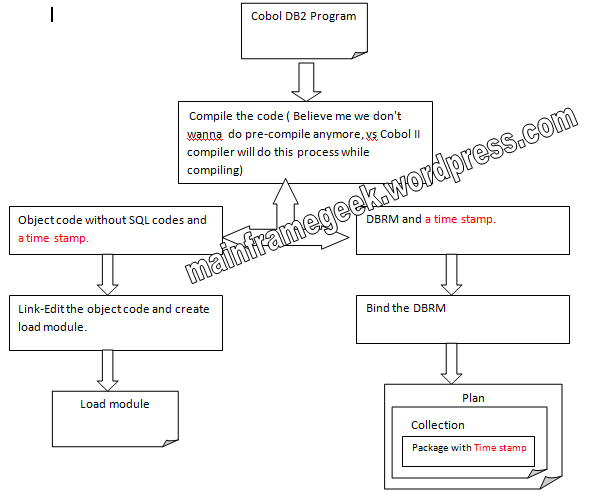
image

Above Diagram is pretty well describes the whole process of compiling a cobol DB2 program. As I mentioned in the image, precompile step I sno longer required in the latest releases of Cobol, the compiler itself is capable of doing this task.

Step 5. RUN Program

When COBOL-DB2 Program executes, the plan and Package must specified in the SYSIN, When the first sql statement of our program executes, db2 search the collections and consistency token in the provided plan using the provided package name, if the consistency token is not matching gDB2 throw a -805 Error.


Cobol-DB2-Compile-BIND-RUN JCL.

//R0318BDJ JOB (12345678),MSGCLASS=H,REGION=4M,                    
//        MSGLEVEL=(1,1),CLASS=A,NOTIFY=&SYSUID                   
//*                                                               
//JOBLIB    DD DSN=DSN910.DB9G.SDSNEXIT,DISP=SHR                  
//          DD DSN=DSN910.SDSNLOAD,DISP=SHR                       
//*****************************************************************
//* SQL PREPROC AND COBOL COMPILATION:                            
//*****************************************************************
//*-NB---SQL PREPROC NOW IS NOW DONE BY THE COBOL COMPILER:       
//*****************************************************************
//COB     EXEC  PGM=IGYCRCTL,                                     
//            PARM=(SQL,LIB,NOTERM,NOSEQUENCE,LIB,XREF,DYN,'')    
//STEPLIB   DD DSN=IGY410.SIGYCOMP,DISP=SHR                       
//          DD DSN=DSN910.SDSNLOAD,DISP=SHR                       
//DBRMLIB   DD DSN=TSHRCI.PGMG.DBRM(MYTAB),DISP=SHR  <<Desired DBRM Loc
//SYSIN     DD DSN=TSHRCI.PGMG.COBOL(MYTAB),DISP=SHR <<SRCE LIB      
//SYSLIB    DD DSN=TSHRCI.PGMG.COBOL,DISP=SHR <<CPYBK LIB                
//SYSLIN    DD DSN=&&LOADSET,DISP=(MOD,PASS),UNIT=SYSDA,          
//             SPACE=(800,(500,500))                              
//SYSPRINT  DD SYSOUT=*                                           
//SYSUDUMP  DD SYSOUT=*                                           
//SYSUT1    DD SPACE=(800,(500,500),,,ROUND),UNIT=SYSDA           
//SYSUT2    DD SPACE=(800,(500,500),,,ROUND),UNIT=SYSDA           
//SYSUT3    DD SPACE=(800,(500,500),,,ROUND),UNIT=SYSDA           
//SYSUT4    DD SPACE=(800,(500,500),,,ROUND),UNIT=SYSDA           
//SYSUT5    DD SPACE=(800,(500,500),,,ROUND),UNIT=SYSDA           
//SYSUT6    DD SPACE=(800,(500,500),,,ROUND),UNIT=SYSDA           
//SYSUT7    DD SPACE=(800,(500,500),,,ROUND),UNIT=SYSDA           
//*****************************************************************
//*            LINKEDIT                                           
//*****************************************************************
//LKED    EXEC PGM=IEWL,PARM='XREF',COND=(4,LT,COB)               
//SYSLIB   DD  DISP=SHR,DSN=CEE.SCEELKED                          
//         DD  DISP=SHR,DSN=DSN910.SDSNLOAD                       
//         DD  DISP=SHR,DSN=DFH320.CICS.SDFHLOAD                  
//         DD  DISP=SHR,DSN=ISP.SISPLOAD                          
//         DD  DISP=SHR,DSN=GDDM.SADMMOD                          
//SYSLIN    DD DSN=&&LOADSET,DISP=(OLD,DELETE)                    
//          DD DDNAME=SYSIN                                        
//SYSLMOD   DD DSN=TSHRCI.LOAD.LIB,DISP=SHR <<desired LOAD LIB 
//SYSPRINT  DD  SYSOUT=*                                           
//SYSUDUMP  DD  SYSOUT=*                                           
//SYSUT1    DD  SPACE=(1024,(50,50)),UNIT=SYSDA                    
//SYSIN     DD *                                                   
     NAME MYTAB(R)  << Program Name                                 
/*                                                                 
//*****************************************************************
//* BIND                                                           
//*****************************************************************
//BIND    EXEC PGM=IKJEFT01,DYNAMNBR=20,COND=(4,LT)                
//DBRMLIB   DD DSN=TSHRCI.PGMG.DBRM,DISP=SHR                       
//SYSTSPRT  DD SYSOUT=*                                            
//SYSPRINT  DD SYSOUT=*                                            
//SYSUDUMP  DD SYSOUT=*                                            
//SYSOUT    DD SYSOUT=*                                            
//SYSTSIN   DD *                                                   
  DSN SYSTEM(DB9G) <<Change this to your DB2 subsystem>>    
  BIND PLAN(MYTABP) MEMBER(MYTAB) -                                
        ACT(REP) ISO(CS) ENCODING(EBCDIC)                          
  END                                                              
/*                                                                 
//*****************************************************************
//* RUN PGM                                                        
//*****************************************************************
//RUNPGM   EXEC PGM=IKJEFT01,DYNAMNBR=20 COND=(4,LT)               
//STEPLIB  DD DSN=DSN910.SDSNLOAD,DISP=SHR                         
//SYSTSPRT DD SYSOUT=*                                             
//SYSPRINT DD SYSOUT=*                                             
//SYSUDUMP DD SYSOUT=*                                             
//SYSOUT   DD SYSOUT=*                                             
//SYSTSIN DD *                                                     
DSN SYSTEM(DB9G) <<Change it to your db2 subsystem>>        
RUN PROGRAM(MYTAB) PLAN(MYTABP) LIB('TSHRCI.LOAD.LIB')            
END                                                               
//*

Screen shots

image

image